What to expect after disconnecting your service
We appreciate the time you spent with us, and we’re sorry to see you go. Whether you’re moving, switching providers, or simply taking a break, we want to support you.
This guide walks you through everything you need to know following your service disconnection — including billing, equipment returns, refunds, and how to come back if you change your mind.
Disconnection timeline and service access
Once your disconnection request is processed, your service remains active until your scheduled disconnect date. Disconnection can happen as early as 12:01 AM on that date. You can continue using your services until then.
Our services are billed on a monthly subscription basis, and your billing cycle continues through the disconnect date. This means your final bill will reflect charges through the end of your billing cycle, even if you stop using the service earlier.
Final billing and charges
Your final bill will be issued on your regular billing date and may include a combination of full-month charges, prorated credits, and applicable fees. The type of services you had determines how your charges are calculated.
Services eligible for prorated credits
Some services are eligible for prorated credits. That means you may be credited from your disconnect date to the end of your billing cycle. Eligible services include, but aren’t limited to, business internet service, inside wire maintenance, and some plan add-ons.
Services not eligible for prorated credits
Other services will be billed in full through the end of your billing cycle and aren’t eligible for partial credits. These services include, but aren’t limited to residential internet service, Frontier-provided equipment, and some plan add-ons.
Check your order confirmation email for more details on final service charges.
Additional charges that may appear on your final bill
- Early Termination Fee (ETF): If you canceled before the end of a contract or promotional period.
- Equipment Restocking Fee: A one-time fee to cover the cost of processing returned equipment.
- Unreturned Equipment Fee: Applied if equipment is not returned within 30 days of disconnection.
If you had Auto Pay active at the time of disconnect, any final charges will be paid via the Auto Pay payment method you previously set up.
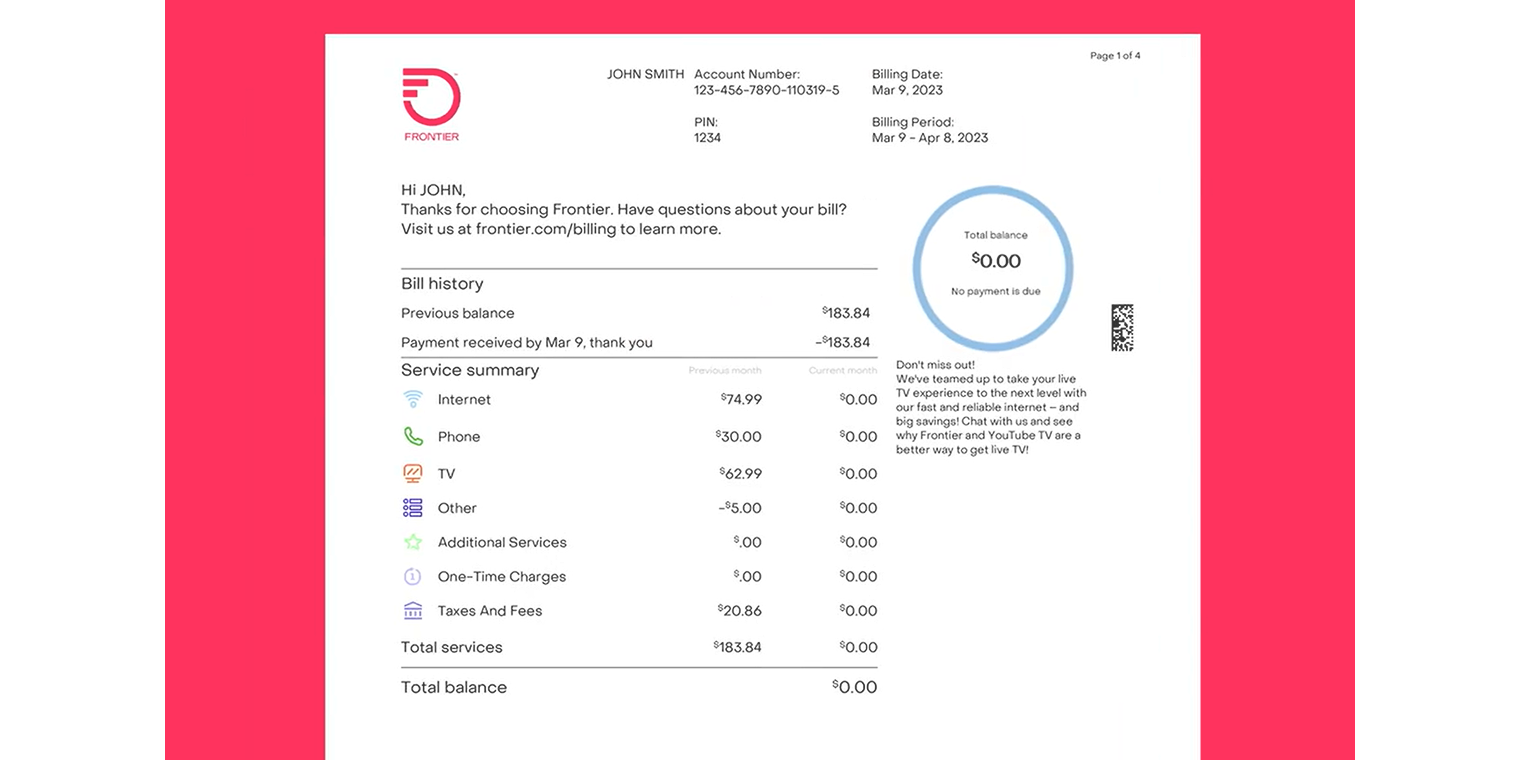
How to close my account and read final bills
If you’ve disconnected your Frontier services, here’s what you need to know about understanding any final charges.
Equipment returns
Returning your equipment on time is essential to avoid unreturned equipment fees. You have 30 days from your disconnect date to return any Frontier-provided equipment (including power cords).
QR code
-
You’ll receive a QR code via text or email.
-
Bring the code and your equipment to any The UPS Store. Find a location near you.
-
UPS will pack and ship your equipment at no cost to you. You’ll also get a receipt with a tracking number.
Need to retrieve your QR code again? Check the email or text/SMS we sent with your QR code. You can also sign in to the MyFrontier app and tap your return order details on your dashboard.
Return mailer
-
If you declined the QR code, a return kit will be mailed to you.
-
Kits arrive within 5–7 business days and include prepaid shipping materials and instructions.
-
Return the kit to any location that accepts UPS packages. If you don’t get a receipt, you can save the tracking number from the return label.
We’ll send you a text/SMS when we receive your return.
If equipment is not returned within 30 days, an unreturned equipment fee of up to $500 will be charged to your account.
Need more help with equipment returns? Visit our support page for more details.
Refunds and credit balances
If your account has a credit balance after disconnection, you’ll be eligible for a refund if you have no outstanding fees.
Refunds are processed after your final bill is paid and any equipment returns or adjustments are completed. If you paid a service deposit and are disconnecting in your first year, your deposit will be refunded on your final bill.
Refund methods
- Amounts under $5 or over $500 are issued via paper check and mailed to the billing address on your account.
- All other amounts are issued via prepaid MasterCard and mailed to the billing address on your account.
Refund timeline
- Refunds are processed in up to three billing cycles.
- You should receive your refund within 15–20 business days after processing.
- Refunds can’t be expedited.
You may continue to receive statements showing a credit balance until the refund is finalized.
Questions about your final charges
We strive to ensure your final bill is accurate. If you believe there’s an error, you may be eligible to dispute certain charges. Valid disputes include:
- Charges for services after your disconnect date
- Equipment return fees when equipment was returned on time
- Early termination fees applied in error
- Missing credits that were promised or expected
Charges for services billed through the end of the billing cycle, as well as taxes and surcharges, are not eligible for dispute.
How to get help with a billing issue
-
Sign in to the MyFrontier app
-
Go to My Billing from the navigation menu.
-
Tap Get help with your bill to start your request.
Note: If your account was transferred to a collection agency, please contact the agency directly. We’re unable to assist with accounts once they’re in collections.
Reactivating service
If you decide to return, we’d be happy to welcome you back. Reactivation is simple and may include special offers for returning customers.
Steps to reactivate service
- Pay any outstanding balance
- Place a new order for service (if your account has been disconnected more than 30 days) or chat with us if your account has been disconnected for less than 30 days.
- Pay a refundable service deposit, if required
- Take advantage of offers, if you’re eligible
Note: Service availability and installation timelines may vary by location
Most services are billed through the end of your billing cycle. Only some eligible services may receive prorated credits. Refer to the Final billing and charges section above for more details.
Only some services (like some voice products) are eligible for prorated credits. Most internet and TV services are billed in full. Refer to the Final billing and charges section above for more details.
You have 30 days from your disconnect date to return any Frontier-provided equipment (including power cords). An unreturned equipment fee of up to $500 is charged to your account if your equipment isn’t returned within 30 days of disconnect.
If you returned your equipment but were still charged an unreturned equipment fee, please chat with us.
You may receive up to three final bills, especially if there are delayed charges such as pay-per-view, unreturned equipment, or late fees. Refer to the Final billing and charges section above for more details.
Only for services eligible for prorated bill credits. Some services are billed in full. Refer to the Final billing and charges section above for more details.
You can find your QR code on either Frontier.com or in the MyFrontier app by simply logging into your account and viewing your order status.
If you did not receive or cannot locate your QR email, please check your spam folders. If you need another QR code sent via email and/or SMS, please chat with us.
If you requested a return mailer initially and need another one sent, click here. Additional or replacement return mailer kits can only be requested if the original return method selected was return mailer. Mailers can take 5-7 business days to be delivered. If you would like to change your return method to QR code, please chat with us.
If you received a QR code but would like a return mailer sent, or you received a return mailer and would now like to return via QR code, please chat with us.
Returns by QR code are only accepted at The UPS Store locations. Locations that are UPS affiliated or contracted will not accept the QR code.