Set up My Wi-Fi Backup
Learn how to install your internet backup device and set up your Wi-Fi network.
Step 1: Download the eero app
Download the eero app, create an account, and follow the steps below to complete installation. If you already have the eero app, please make sure it’s updated to the latest version.
Step 2: Set up your Unbreakable™ Wi-Fi Device
Installation of Unbreakable Wi-Fi requires an active Frontier Internet connection. Don’t wait for an outage to set up Unbreakable Wi-Fi! If you’re currently experiencing a service outage, please wait until your service is restored before proceeding with steps below.
The Unbreakable™ Wi-Fi Device will only work with a Frontier-provided eero.
- Make sure you’re signed into the eero app.
- Gather your supplies. Your self-installation kit should have your backup device, an Ethernet cable, and a power cord.
- Connect the Ethernet cable to your My Wi-Fi backup device and plug the other end into any eero device you already have in your home. Connect the power cord to your backup device and plug it into an electrical outlet.
Note: Model and shape of your existing Frontier-provided eero routers/extenders may vary.
If you choose an eero connected to the wall jack via Ethernet, this picture below illustrates how it should look when you are done: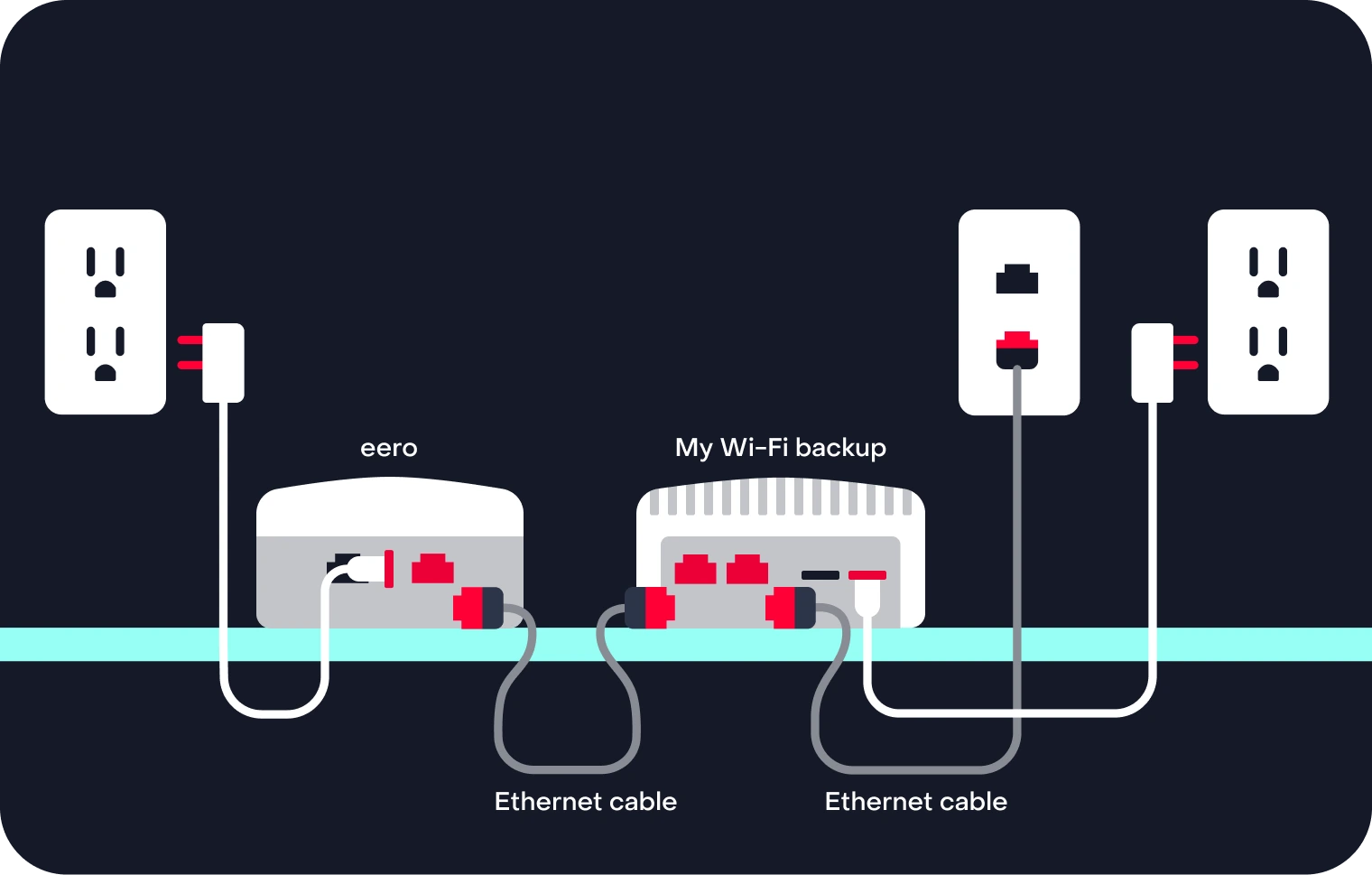
If you choose an eero not connected to the wall jack via Ethernet, this picture below illustrates how it should look when you are done:
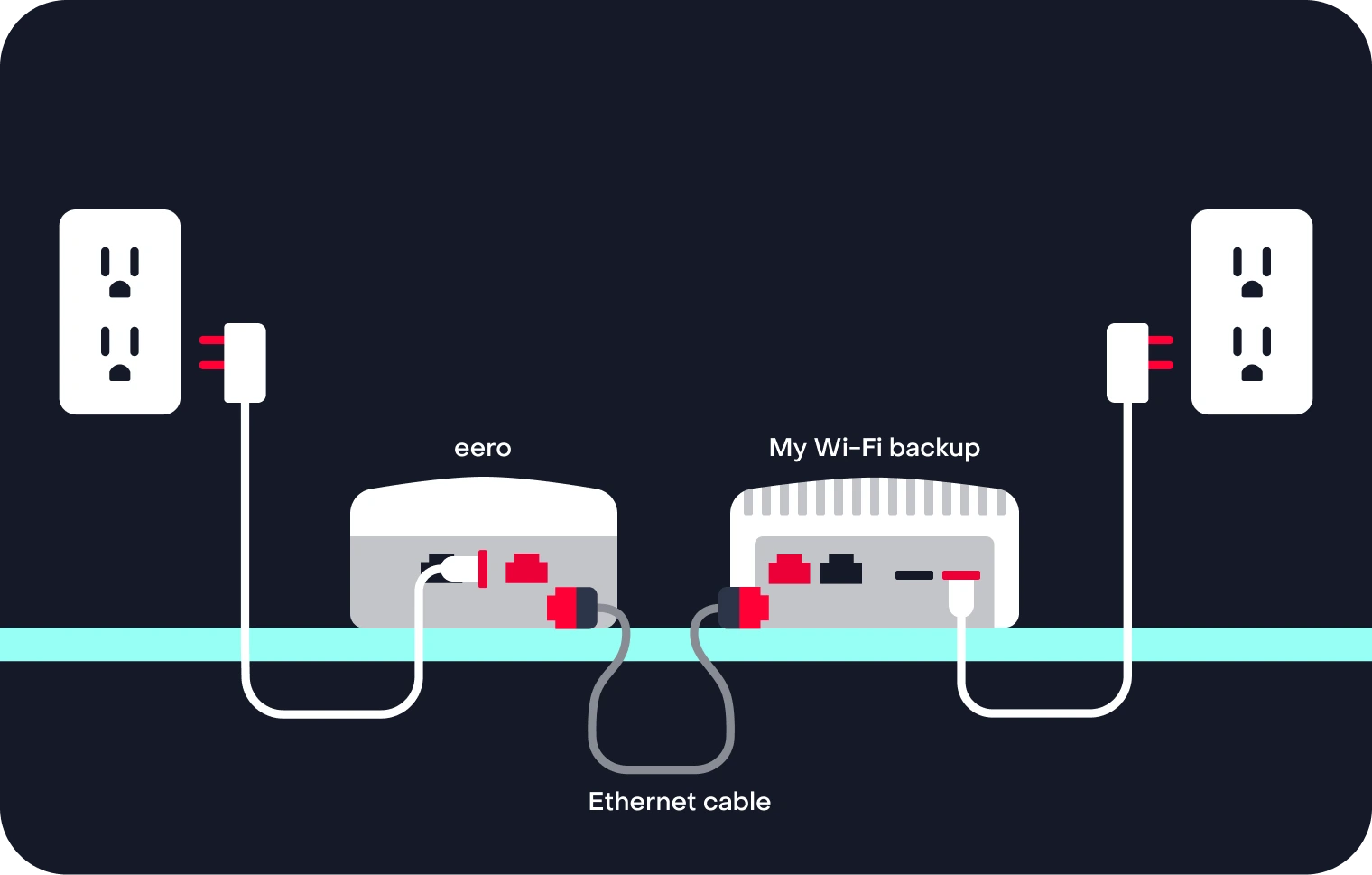
The color of your Ethernet cables and appearance of your eero may vary.
- Open the eero app and wait for the app to detect your device. It can take about 5 minutes for the device to power on and be detected.
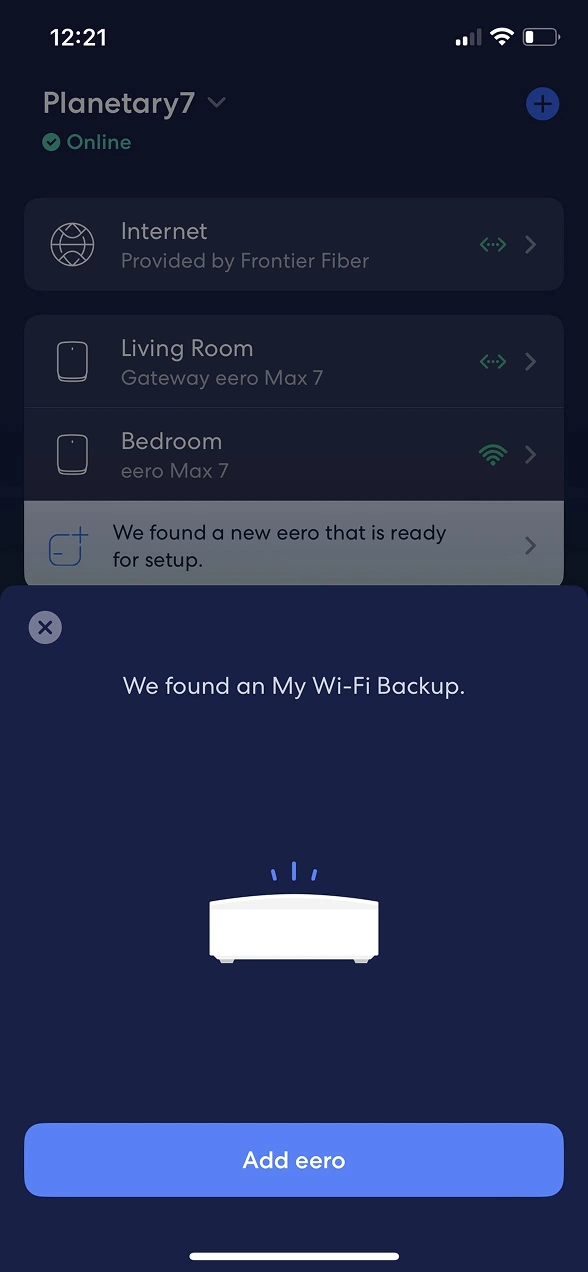
- Once your device is detected, you’ll see a message on your home screen that says “We found a new eero that is ready for set up.” Tap that message.
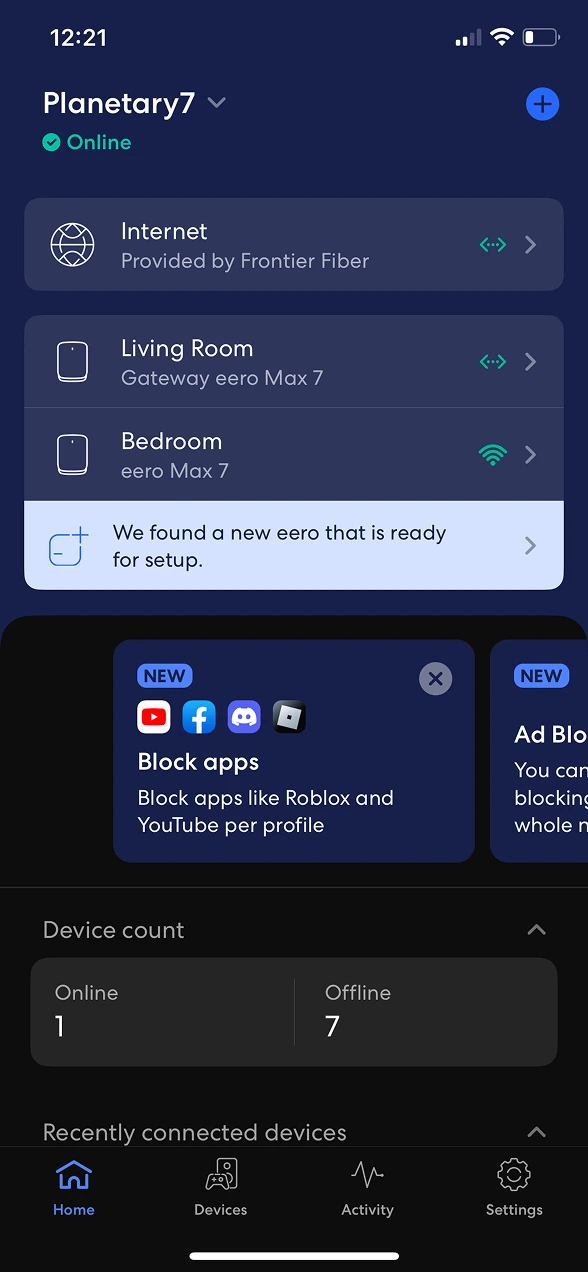
- You’ll be prompted to add the My WiFi Backup device. Select “Add eero” to continue.
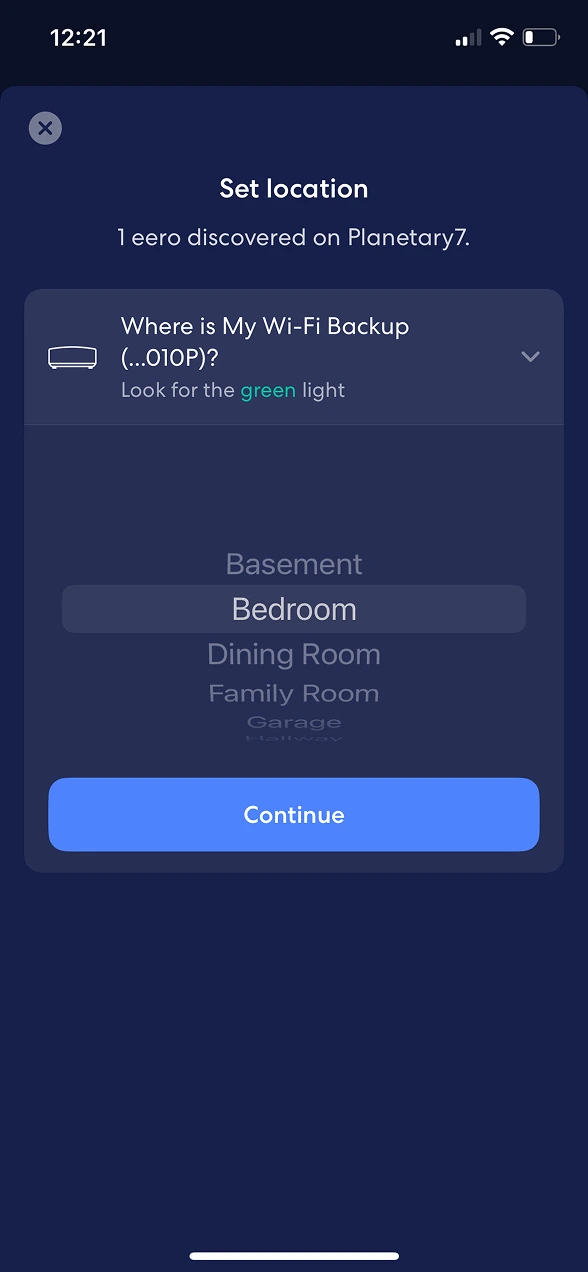
- Next, you’ll be prompted to set the location for your My WiFi Backup device, the Example: Living Room. Tap Continue.
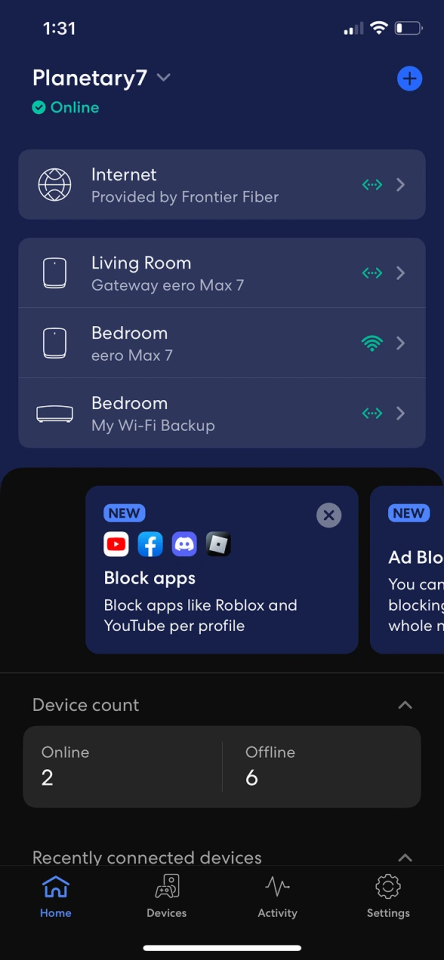
- That’s it! Your backup device will automatically update it’s firmware, and then it will be ready to provide backup Wi-Fi.
If the blue light continues to spin on your device, please know your backup device is working as expected. The light can spin for an hour or more after installation or after the device restarts.
Troubleshooting your backup device
- Make sure you’re signed into the eero app.
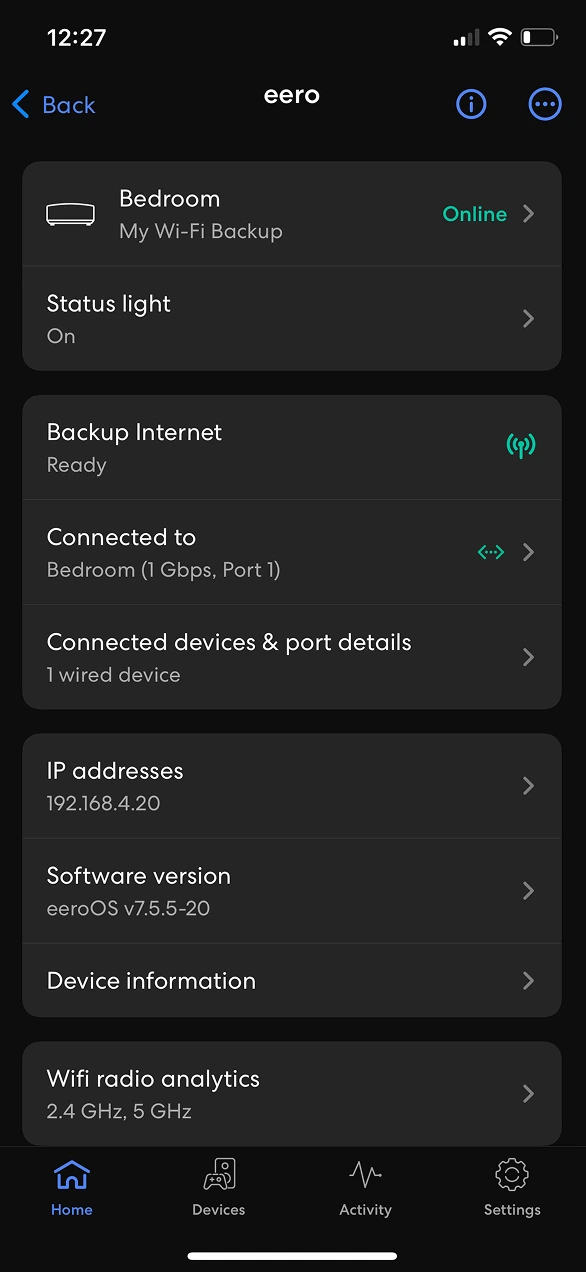
- Tap the Online tab at the top of the screen. The signal strength icon will appear to the right of each eero device. Find the My Wi-Fi Backup device.
- If your signal strength is good, unplug your My Wi-Fi Backup device and wait a few minutes before plugging it back in.
Need more support? Chat with us for technical help.
An internet outage occurs when your Frontier Internet service is interrupted, but your home still has power. During an internet outage, the Unbreakable™ Wi-Fi device uses a cellular connection to automatically provide devices connected to your Wi-Fi network with access to the internet.
To use Unbreakable™ Wi-Fi during a network outage, you’ll need:
- An active subscription to the Unbreakable™ Wi-Fi service
- Power to your home and your Unbreakable™ Wi-Fi device
- Available data
You can select which devices you want to keep connected to Unbreakable™ Wi-Fi in the eero app by turning Allow Internet Backup on or off for each selected device. Please note, your devices must be charged or have an external power source to connect to Backup Internet.
Unbreakable™ Wi-Fi uses cellular connectivity and is subject to availability and coverage in your area.
Extra data charges may apply. Cellular data is provided by a third-party carrier. Coverage, uptime, technology, and speeds will vary. May require backup power if the power goes out. Visit frontier.com/unbreakablewifi for more details.
Unbreakable™ Wi-Fi includes 130GB of monthly data. What you can do with 130GB of data:
- Watch approx. 60 hours (about 5 days) of streaming video (Netflix, Hulu, or Prime Video).
- Video chat on Zoom for approx. 80 hours (about 7 days).
If you’ve used all of your included data, your backup connection will turn off and your internet-connected devices won’t connect to your Wi-Fi through the backup device. Your data allowance will not refresh until the next billing cycle.
Unbreakable™ Wi-Fi should be able to connect to cellular coverage in almost all Frontier Fiber areas. The device includes a cellular signal strength indicator. If you live in an area with a very poor or no signal, you may not be able to use the device. You should test the device for signal quality when you receive it. If you have poor signal quality, you can chat for assistance in placing the device to receive a better signal. If the problem cannot be resolved, you may call us to cancel the service at no cost within 30 days of your order.